Vidu Text to Video
Choose text to video when you have a scene idea but no source image. Explore subjects, settings, and compositions from a written prompt.
Create AI videos online with Vidu AI from text prompts, images, and visual references. Turn ideas into cinematic clips, anime scenes, product videos, social content, and ads with flexible Vidu AI video generation workflows.
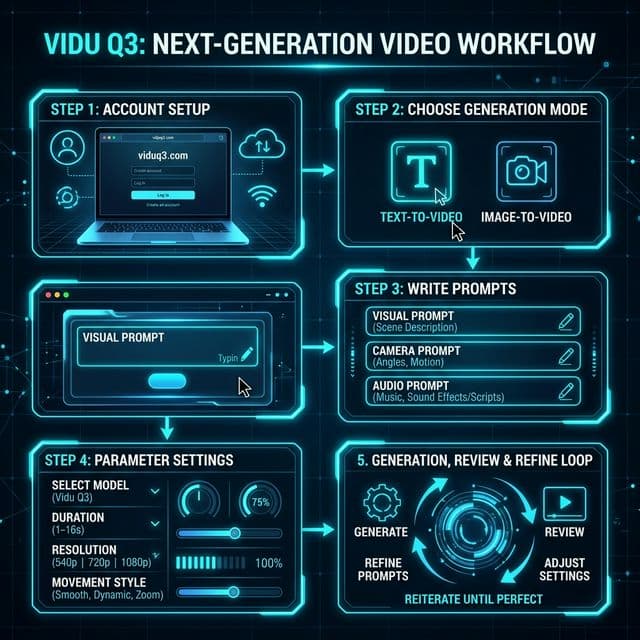
Vidu AI is an AI video generation platform for creating videos from text prompts, images, and visual references. Instead of filming or animating every shot manually, creators can describe a scene, upload source visuals, choose a generation workflow, and turn the idea into a short AI-generated video.
Vidu supports text-to-video, image-to-video, and reference-to-video workflows, making it useful for everything from early creative concepts to anime clips, cinematic scenes, product visuals, ads, and social media content.
The Vidu Q3 generation includes workflows with native audio-video generation, longer clips, camera control, and reference-based visual consistency on supported models.
Start with the input you already have, then follow the dedicated guide for that workflow.
Choose text to video when you have a scene idea but no source image. Explore subjects, settings, and compositions from a written prompt.
Choose image to video when you already have a photo or artwork and want to animate its subject or starting composition.
Choose reference to video when you need to guide recurring characters, products, or scene elements with multiple visual references.
Match the model to text, a source image, or multiple references first. The comparison table below shows which inputs each available model accepts.
Compare Pro, Turbo, and fast image workflows against your project needs. Use a small draft to judge the result before spending credits on more variations.
Use a general workflow for open-ended scenes. Consider Q3 Ad for product campaigns or Q3 Drama for dialogue and character interactions.
Duration, resolution, audio, and aspect-ratio options vary by model and input mode. Review the active tool settings and credit cost before submitting.
Create animated character scenes, stylized motion, anime concepts, and short story moments from prompts or artwork.
AI Anime Video GeneratorTurn product images and creative concepts into short promotional videos for ads, landing pages, social campaigns, and e-commerce content.
Vidu Q3 AI Ad GeneratorPrototype film shots, camera ideas, character interactions, environments, and short narrative sequences before moving into a larger production workflow.
Vidu Q3 AI Drama GeneratorGenerate short-form visual concepts for TikTok, YouTube Shorts, Reels, and other social platforms using text, images, or reusable visual references.
Start with Text to Video when you only have an idea, Image to Video when you want to animate an existing visual, or Reference to Video when you need greater consistency and control.
Describe the subject, action, environment, camera direction, lighting, and style. Upload an image or reference material when your chosen workflow requires it.
Choose the Vidu model that matches your workflow, quality target, generation speed, and creative requirements.
Configure the available duration, resolution, aspect ratio, motion, and audio options for the selected model.
Generate the video, review the result, and improve the prompt or settings when you want a different movement, composition, style, or pacing.
Choose a Vidu AI model based on your input workflow, video quality, speed, duration, and creative goal. Model capabilities vary, so check the available settings before generating.
Swipe horizontally to compare all model details.
| Model | Best For | Duration | Resolution | Main Workflow | Key Difference |
|---|---|---|---|---|---|
| Vidu Q4 Preview | High-resolution image and reference creation | 3–16s | Up to 4K | Image to Video, Reference to Video | Native audio; up to 15 image references and 3 voice samples in Reference to Video |
| Vidu Q3 Pro | High-quality general creation | 1–16s | Up to 1080p | Text, image | Synchronized audio-video and smart scene cuts |
| Vidu Q3 Turbo | Fast, lower-cost iteration | 1–16s (text/image), 3–16s (reference) | Up to 1080p | Text, image, reference | Faster generation and lower API cost than Pro |
| Vidu Q3 Pro Fast | Fast image-to-video | 1–16s | 720p / 1080p | Image to video | Dedicated fast Pro image workflow |
| Vidu Q3 | Reference consistency | 3–16s | Up to 1080p | Reference to video | Intelligent camera switching and cross-shot consistency |
| Vidu Q3 Mix | Balanced reference generation | 3–16s | Up to 1080p | Reference to video | Balance of consistency, aesthetics and scene transitions |
| Vidu Q3 Drama | Short drama and storytelling | 3–15s | 720p / 1080p | Reference to video | Dialogue, blocking, motion and cinematic storytelling |
| Vidu Q3 Ad | Short-form advertising | 3–15s | 720p / 1080p | Reference to video | Tuned for ads, with 5–8s highlighted as a target range |
Workflows and duration ranges shown here reflect the options currently available in this site's generator. First/last-frame controls are not available in this interface.
You can start using the Vidu AI Video Generator on this site with available starter credits. When you need more generations, additional credits can be purchased based on your usage instead of requiring a monthly subscription.
Credit usage depends on the Vidu model, video duration, resolution, and generation settings you choose. Review the current pricing page before generating if you need to estimate project cost.
Vidu AI is an AI video generation platform that creates videos from text prompts, images, and visual references using multiple video generation workflows and models.
You can start creating on this site with available starter credits. Additional credits can be purchased when you need more generations.
Yes. Vidu text-to-video workflows let you describe a scene in a prompt and generate a video based on the subject, action, environment, camera direction, and visual style.
Yes. Image-to-video workflows use an uploaded image as the visual starting point and generate motion based on your prompt and selected settings.
Reference-to-video lets you use visual references to guide characters, objects, scenes, or style during video generation. It is useful when consistency is more important than generating everything from text alone.
Supported Vidu Q3 workflows can generate synchronized audio with the video, including dialogue, voiceover, sound effects, and music. Availability depends on the model and workflow.
Duration depends on the model and workflow. Supported Vidu Q3 workflows can generate clips up to 16 seconds in a single generation.
Vidu AI refers to the broader video creation platform and its generation workflows, while Vidu Q3 is a generation in the Vidu model family. A Vidu AI workflow may use different Vidu models depending on the type of video you want to create.
Turn a prompt, image, or visual reference into an AI-generated video with Vidu AI. Choose the workflow and model that fits your project, then generate and refine your first clip.