Vidu Q3 Review: Who It's Actually For (and Who Should Skip It)

AI video generation has moved fast in the past year, and Vidu Q3 is part of that shift. The model combines short-form video generation with native audio and video in a single generation pass on supported workflows.
But does it actually hold up in real-world use? We tested Vidu Q3 AI Video Generator for two weeks across anime clips, product demos, cinematic scenes, and social media content. Here's an honest breakdown of what works, what doesn't, and who should consider using it.
What Is Vidu Q3?
Vidu Q3 is a multimodal AI video generation model developed by Shengshu Technology in collaboration with Tsinghua University's TSAIL Lab. It was released on January 30, 2026, and represents a significant upgrade over its predecessor, Vidu Q2.
The core idea behind Vidu Q3 is simple: generate complete video clips — with synchronized dialogue, sound effects, and background music — from a single text prompt or image input. No stitching. No post-production audio layering. One generation, one finished clip.
Here are the headline specs:
- Duration: 1 to 16 seconds per generation
- Resolution: Up to 1080p on supported models and workflows
- Audio: Native dialogue, SFX, and BGM generation
- Styles: Anime, cinematic live-action, 2D cartoon, 3D animation
- Input modes: Text-to-video, image-to-video, start-end frame control
- Aspect ratios: Available options vary by workflow; reference-to-video supports 16:9, 9:16, and 1:1
If you're coming from Q2, the biggest differences are the extended duration (up from 8 to 16 seconds), integrated audio, and the new Smart Cuts feature — which we'll cover in detail below.
Key Features Reviewed
1. Native Audio-Video Generation
This is the headline feature, and it genuinely changes the workflow. Most AI video tools — including Runway Gen-3 and earlier versions of Kling — generate silent footage. You then need to find music, record voiceover, and manually sync everything in a timeline editor.
Vidu Q3 handles all three audio layers at once:
- Dialogue with lip-sync (supports English, Chinese, and Japanese)
- Sound effects matched to on-screen actions (footsteps, explosions, rain)
- Background music that fits the scene's mood and pacing
In our testing, the audio-visual synchronization worked best for ambient scenes — a rainy street with distant traffic, a forest with birds and wind. The overall mood consistently matched the visuals without any manual tweaking.
Where it struggled: complex dialogue scenes. When a character speaks more than two sentences, lip-sync accuracy drops noticeably. The mouth movements become "floaty" rather than precisely matched. For short lines — a greeting, a dramatic one-liner, a product tagline — it works well enough for social media or storyboarding. For anything requiring broadcast-quality lip-sync, you'll still want to handle dialogue in post.
Visual: Medium shot of a young woman in a café, warm morning light, she picks up a coffee cup and looks out the window.
Camera: Slow push-in over 8 seconds.
Audio: Soft jazz piano BGM. Sound of coffee cup on saucer. She says: "I think today is going to be different."
2. Smart Cuts (Multi-Shot Storytelling)
This is the feature that most surprised us. Traditionally, AI video models generate one continuous shot. If you want a scene with multiple camera angles — say, a wide establishing shot cutting to a close-up — you'd need to generate each shot separately and edit them together.
Vidu Q3's Smart Cuts system automatically switches camera angles within a single generation. You describe a scene, and the model decides when to cut based on the narrative content.
In practice, this works remarkably well for action sequences. We tested a prompt for a fight scene between two anime characters, and the model delivered:
- A wide shot for the opening stance
- A quick cut to a close-up during the punch
- A slow-motion side angle for the impact
- A pull-back to show the aftermath
The transitions felt intentional, not random. It's the closest any AI video tool has come to mimicking actual film editing.
However, the system is not fully controllable. You can suggest shot types in your prompt ("start with a wide shot, cut to close-up"), but the model sometimes ignores these instructions or adds its own creative decisions. For storyboarding and concept exploration, this creative autonomy is a bonus. For precise commercial work where every frame matters, it can be frustrating.
3. 16-Second Extended Duration
Previous AI video models typically maxed out at 4-8 seconds. Vidu Q3 pushes this to 16 seconds, which sounds modest but makes a significant practical difference.
16 seconds is enough to tell a three-beat story: setup, development, resolution. It's long enough for a complete product demo, a TikTok hook, or a short narrative scene. You stop thinking in "clips" and start thinking in "scenes."
The trade-off is credit cost. A 16-second clip at 1080P costs significantly more than a 4-second test. We found the sweet spot at 8-12 seconds for most use cases — long enough for substance, short enough to keep costs reasonable during the iteration phase.
4. Anime and 2D Animation Quality
This is where Vidu Q3 truly differentiates itself from the competition. If you're creating anime-style AI video, Vidu Q3 delivers results that other models simply can't match.
The model preserves flat shading, maintains clean line art, and applies frame spacing that feels like traditional cel animation. Characters don't "melt" or warp during movement — a common problem with general-purpose AI video tools trying to render anime aesthetics.
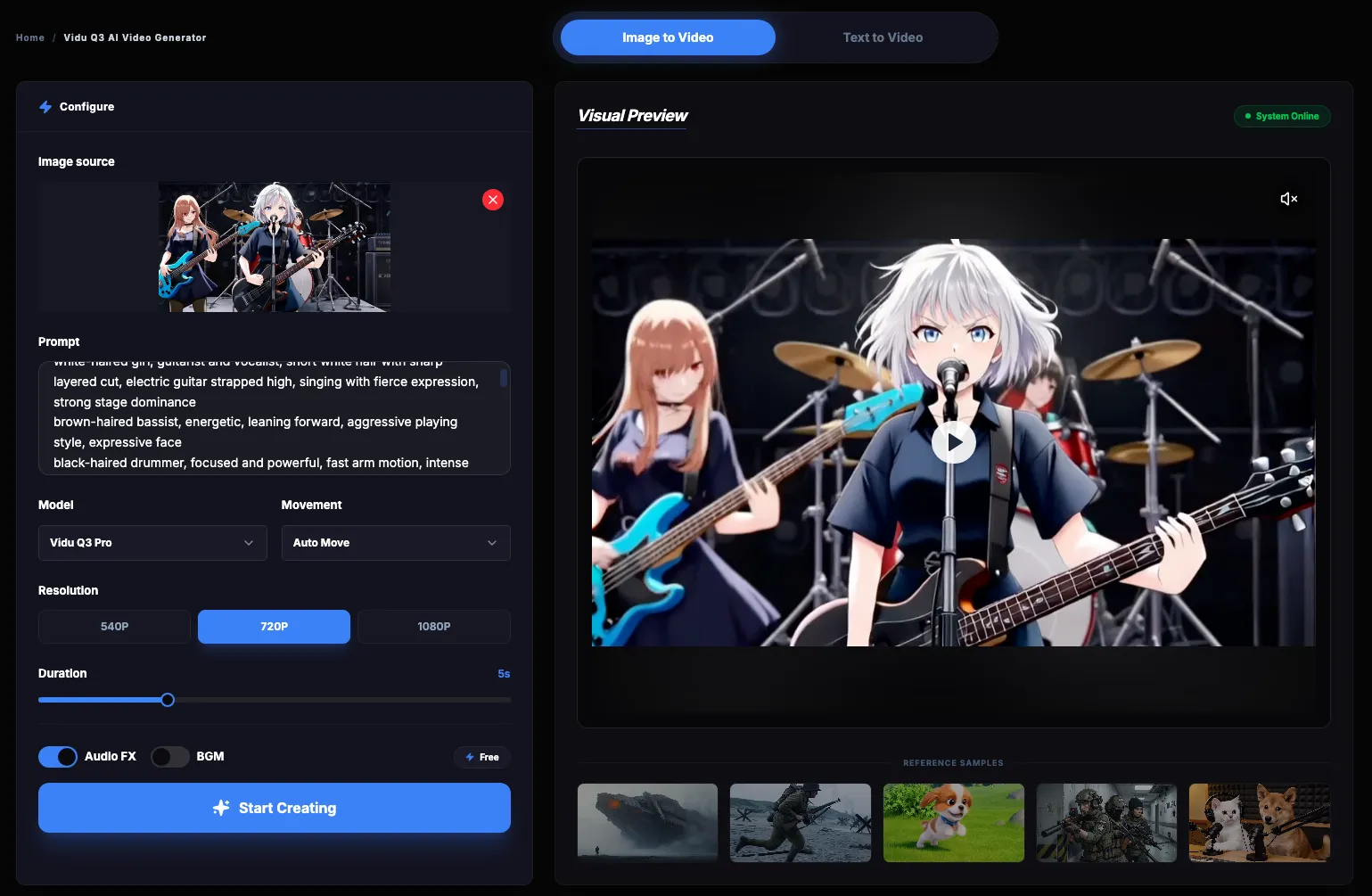
We tested it with a character sheet upload (image-to-video mode), and the model maintained near-perfect consistency: same face, same outfit, same proportions across a full 12-second clip with multiple camera angles. That level of character fidelity in anime style is something we haven't seen from Runway, Kling, or Pika.
5. Image-to-Video Animation
The image-to-video pipeline is straightforward: upload a static image, add a motion prompt, and Vidu Q3 animates it while preserving the original's geometry and style.
This feature is particularly valuable for:
- Manga/comic artists who want to animate a single panel
- Product photographers turning static shots into short video ads
- Character designers testing how their designs move
The model treats the uploaded image as a visual anchor, so the output matches the source much more closely than pure text-to-video. Combined with the first-and-last-frame control option, you can create precise transitions between two keyframes — useful for professional editors building longer sequences.
Vidu Q3 vs. Competitors: Honest Comparison
After testing Vidu Q3 alongside Sora 2, Kling 2.1, Runway Gen-4, and Wan 2.5, here's how they compare on the factors that actually matter:
Where Vidu Q3 wins: Duration, native audio, anime style quality, and multi-shot storytelling. If you need complete scenes with sound — especially in anime or stylized formats — it's currently the strongest option.
Where competitors win: Sora 2 still leads in raw physics accuracy and photorealistic renders. Runway Gen-4 offers the most polished professional editing workflow. Wan 2.5 provides competitive audio features at a lower price point.
For a deeper dive into specific matchups, check out our Vidu vs Kling comparison.
Pricing: What Does Vidu Q3 Actually Cost?
Vidu Q3 uses a credit-based system. You purchase credits upfront and spend them based on the resolution, duration, and features of each generation.
Here's a quick breakdown of what a typical session costs:
- 4s standard test clip: 4-16 credits (~$0.32-$1.60)
- 8s anime scene at 1080P: 16-32 credits (~$1.28-$2.56)
- 16s cinematic with audio: 16-64 credits (~$1.28-$5.12)
The official platform provides free credits for newly registered users to explore the tool. However, ongoing use is credit-based, and there is no unlimited free tier. This ensures high-speed rendering and dedicated GPU resources for all active creators.
For our platform's pricing details, we offer three credit packages with decreasing per-credit costs as you scale up. All packages include commercial licensing and 1080P export.
💡 Cost-saving tip:
Start your creative exploration at standard quality and short durations. Once you've locked down a prompt that works, re-generate at full resolution and length for your final output. This approach can cut your credit usage by 60-70% during the iteration phase.
Limitations You Should Know
No review is complete without covering the rough edges. Here's what we ran into during testing:
- Lip-sync precision is inconsistent. Short phrases work well. Extended dialogue — especially multilingual content — often drifts out of sync. Plan to handle critical dialogue in post-production for now.
- Character consistency in complex scenes. When there are more than two characters interacting simultaneously, features can shift or blend between characters. The issue is most noticeable in realistic style; anime style handles this better.
- Camera drift. The model sometimes adds autonomous camera movements that weren't prompted. For narrative content this can feel organic, but for precise commercial shots it means extra re-rolls.
- Text rendering in video. Vidu Q3 supports rendering text within the video frame (titles, subtitles), but accuracy varies. English and Chinese render reasonably well; complex layouts or small text can become illegible. Use this feature for drafts and social content, not for brand-critical typography.
- Credit cost at scale. If you're producing high-volume content at maximum quality, costs add up quickly. Budget carefully and use the standard/turbo variants for testing.
Who Should Use Vidu Q3?
Based on our testing, Vidu Q3 fits specific workflows better than others:
- • Anime and 2D animation creators
- • Social media teams producing short-form video
- • Marketers prototyping product video ads
- • Filmmakers using character-driven AI video generation for pre-visualization
- • General creators who want complete clips with audio
- • Projects requiring pixel-perfect lip-sync
- • Photorealistic human renders (uncanny valley aspect)
- • Long-form video (requires stitching)
For step-by-step tutorials on getting the best results, check out our Vidu Q3 Practical Guide. For a model-by-model overview, visit the Vidu AI model hub.
How to Get Started
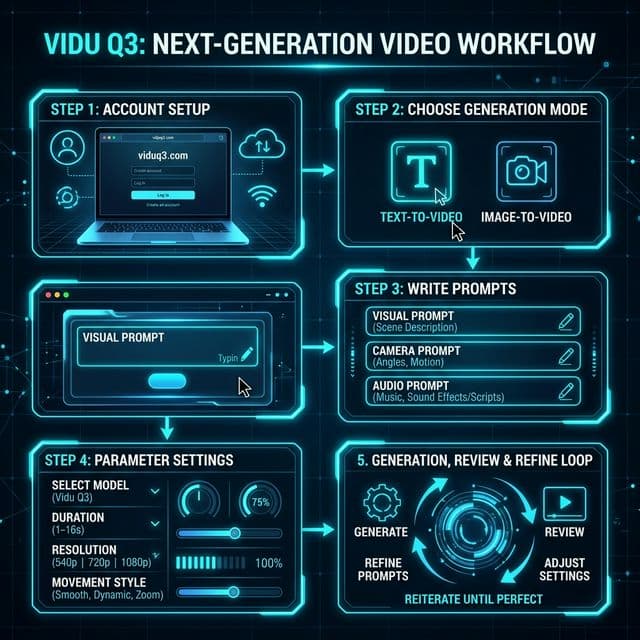
Getting your first video takes about 2 minutes:
- Create an account at viduq3.com (free credits included)
- Choose your mode — Text to Video for starting from scratch, or Image to Video if you have reference art
- Write your prompt using the script format described above (visual + camera + audio)
- Set your parameters — start with a 5-second duration, 1080p resolution, and your desired parameters
- Generate and iterate — review the output, refine your prompt, and re-generate
Verdict: 8.5/10
Vidu Q3 isn't perfect, but it represents the most complete AI video generation package available right now. The combination of 16-second duration, native audio, Smart Cuts, and exceptional anime quality puts it ahead of the competition.
The key word is "specific." If you're an anime creator, a social media marketer, or a filmmaker building storyboards, Vidu Q3 will save you hours of work per project. If you need photorealistic perfection or broadcast-quality lip-sync, you'll want to combine it with other tools or wait for the next iteration.
The fact that AI video has gone from "silent 4-second clips" to "16-second scenes with synchronized dialogue and intelligent camera cuts" in just one year tells you where this technology is heading. Vidu Q3 isn't the final destination — but it's the best vehicle for getting there today.
Ready to create videos
with AI Magic?
Frequently Asked Questions
Is Vidu Q3 free to use?
Vidu Q3 offers free credits to new users upon registration, allowing you to test the AI Video Generator without upfront cost. Once these initial credits are used, further generations require purchasing credit packages. This structure allows us to maintain industry-leading generation speeds for all users. Visit our pricing page for package details.
What's the difference between Vidu Q3 and Vidu Q3 Pro?
Vidu Q3 is the base model, optimized for animation and general video generation. Vidu Q3 Turbo and Vidu Q3 Pro are versions with different parameter sizes; Turbo generates faster, while Q3 Pro delivers higher output quality. Q3 Pro consumes more computing resources per generation but produces higher-fidelity results.
Can I use Vidu Q3 videos commercially?
Yes, all paid credit packages include a full commercial license. You can use generated videos for monetized YouTube channels, social media ads, product marketing, and commercial projects without additional licensing fees.
How does Vidu Q3 compare to Sora 2?
Vidu Q3 offers longer duration (16s vs 12s), native audio generation, and superior anime rendering. Sora 2 leads in physics accuracy and photorealistic quality. For a detailed analysis, read our comparison guide.
Does Vidu Q3 support image-to-video?
Yes. Upload any image — character art, product photo, matte painting — and Vidu Q3 will animate it while preserving the original style and geometry. This works across all supported styles and aspect ratios. Try it in our Showcase to see examples.